Stop hunting through endless PDF pages! Here’s the quickest way to extract your demat account details automatically
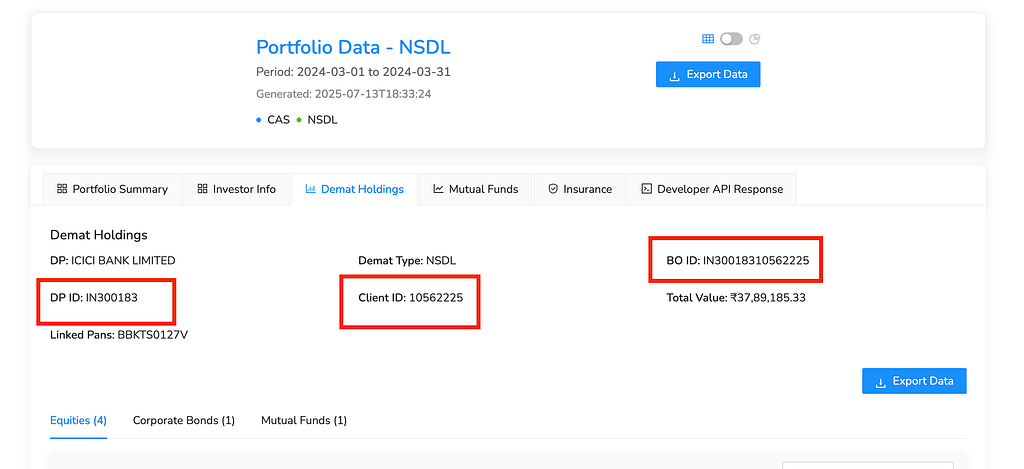
TLDR: Use https://app.casparser.in to auto-find DP ID and Client ID from CAS Statements from NSDL and CDSL.
I was helping my cousin set up his investment account last week, and he got stuck on that dreaded form field: “Enter your DP ID and Client ID.”
Sound familiar? 🤔
If you’re reading this, you’ve probably been there too. You’re trying to open a new demat account, apply for an IPO, or use an investment app, and they ask for these mysterious numbers. You know they’re somewhere in your CAS statement, but finding them feels like searching for a needle in a haystack.
Don’t worry — I’ve got you covered. After dealing with this headache multiple times, I found a way to get these numbers in seconds instead of minutes. Let me show you exactly how.
What Are DP ID and Client ID? (The 2-Minute Explanation)
Before we dive into the solution, let’s quickly understand what these numbers actually are:
Your 16-digit demat account number is split into two parts:
- DP ID (First 8 digits): Identifies your broker (like Zerodha, HDFC Securities, etc.)
- Client ID (Last 8 digits): Your unique customer number with that broker
For example, if your demat account number is 1234567887654321:
- DP ID: 12345678
- Client ID: 87654321
These numbers are printed on every CAS statement you receive from CDSL or NSDL. The problem? Finding them quickly in those dense PDF files is a pain.
The Old Way (Why It Sucks) 😤
Here’s how most people do it:
- Download your latest CAS statement from email or broker website
- Open the PDF (pray it’s not password-protected)
- Scroll through pages of transaction data
- Search for “demat account” or “DP ID”
- Squint at tiny fonts and hope you copy the right numbers
- Double-check because one wrong digit means starting over
Time taken: 5–15 minutes (if you’re lucky) Frustration level: Maximum 📈
The New Way (Game Changer) 🚀
What if I told you there’s a tool that can extract your DP ID and Client ID from any CAS statement in under 30 seconds?
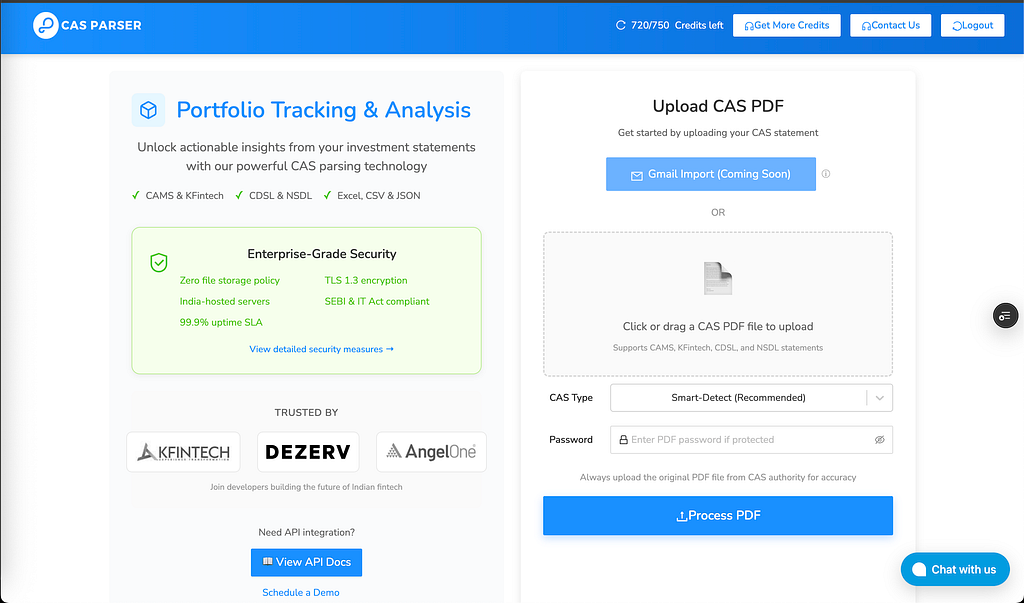
Enter CASParser.in — and no, this isn’t some sketchy website. It’s a legitimate service that thousands of investors and even fintech companies use to parse CAS statements.
Here’s how stupidly simple it is:
Step 1: Go to CASParser.in
Visit the website and look for their CAS parsing tool. They handle both CDSL and NSDL statements.
Step 2: Upload Your CAS Statement
Just drag and drop your PDF file. If it’s password-protected, they’ll ask for the password (usually your PAN or date of birth).
Step 3: Get Your Numbers
Within seconds, you’ll see a structured breakdown of your CAS statement, including your DP ID and Client ID clearly displayed.
That’s it. Seriously.
Why This Works So Well 🎯
Speed: What used to take 10+ minutes now takes 30 seconds Accuracy: No more worrying about copying the wrong digit Convenience: Works on any device with internet Security: Files are processed securely and not stored
Step-by-Step Visual Guide 📱
Since I can’t show you screenshots here, let me walk you through exactly what you’ll see:
1. Upload Screen You’ll see a simple upload area. Just click or drag your CAS PDF file there.
2. Processing Screen The tool will show “Processing your CAS statement…”-this usually takes 10–20 seconds.
3. Results Screen You’ll get a clean breakdown showing:
- Your full demat account number
- DP ID (first 8 digits)
- Client ID (last 8 digits)
- Plus bonus info like your holdings, transactions, etc.
Pro Tips from My Experience 💡
Tip 1: Use Your Latest CAS Statement
Always use the most recent CAS statement. Find CDSL or NSDL statements in your Email inbox from sender emails:
1. CDSL — eCAS@cdslstatement.com
2. NSDL — NSDL-CAS@nsdl.co.in
Tip 2: Know Your Password
Most CAS statements are password-protected. Common passwords:
- Your PAN number
- Date of birth (DDMMYYYY format)
- Sometimes it’s mentioned in the email
Tip 3: Double-Check the First Time
While the tool is accurate, it’s good practice to verify the extracted numbers against your original statement the first time you use it.
Tip 4: Save the Numbers
Once you have your DP ID and Client ID, save them in your phone’s notes or password manager. You’ll need them again.
When Do You Actually Need These Numbers? 🤷♂️
You might be wondering when you’ll actually use these numbers. Here are the most common scenarios:
📈 Opening New Investment Accounts
- Mutual fund platforms
- Alternative investment apps (like Grip Invest for bonds)
- New broker accounts
🎯 IPO Applications
- ASBA applications often require these details
- Some IPO apps ask for demat account info
📊 Portfolio Tracking Apps
- Apps that consolidate your investments
- Tax calculation tools
🏦 Banking Services
- Linking demat account to bank accounts
- Loan applications where securities are collateral
Alternative Methods (If You’re Old School) 📄
If you prefer doing things manually, here’s where to find these numbers in your CAS statement:
In CDSL Statements:
- Look for “Demat Account Number” in the header section
- Usually on the first page, top-right area
In NSDL Statements:
- Search for “DP ID” and “Client ID” in the account summary
- Sometimes listed as “Beneficial Owner Account Number”
Pro tip: Use Ctrl+F (or Cmd+F on Mac) to search for “DP ID” or “demat” in the PDF.
Why I Recommend CASParser.in 🌟
I’ve tried several CAS parsing tools, and here’s why CASParser.in is my go-to:
✅ It actually works: Unlike some tools that fail on complex PDFs, this one consistently delivers
✅ Fast processing: Most statements are parsed within 30 seconds
✅ Handles both CDSL and NSDL: Works with statements from any depository
✅ Secure: They don’t store your files after processing
✅ Free tier available: You can try it without paying anything
✅ Used by professionals: Even fintech companies use their API
Quick Action Steps 🚀
- Bookmark CASParser.in right now
- Download your latest CAS statement from your broker
- Upload it to CASParser and get your numbers
- Save your DP ID and Client ID somewhere safe
- Share this guide with other investors who might find it helpful
Final Thoughts 🤔
Investment apps and platforms are getting smarter, but they still ask for these basic details during onboarding. Instead of letting this simple step derail your investment journey, use the right tools to make it effortless.
Your future self will thank you the next time you need to fill out an investment form and you have your numbers ready in seconds, not minutes.
What’s your experience with finding DP ID and Client ID? Have you tried CASParser.in or similar tools? Let me know in the comments below!
P.S. If you found this guide helpful, consider sharing it with fellow investors. We’ve all been stuck on this step at some point! 😊